Exhibit E
ASL Classifier
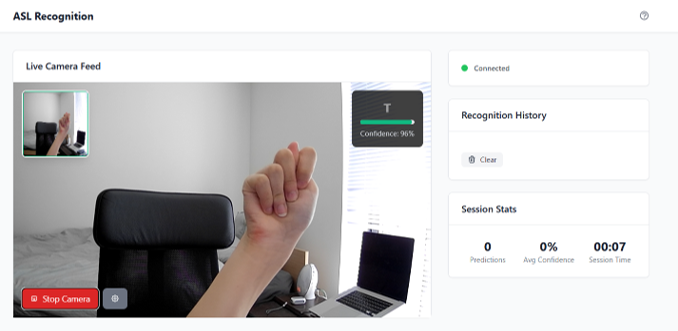
A real-time American Sign Language classifier that runs in the browser, recognizing hand signs via webcam using a CNN trained on 87,000 images.
- Python
- TensorFlow
- FastAPI
- MediaPipe
- OpenCV
- Docker
How it started
I sail with the UBC Thunderbirds. It’s a big team with people from a lot of different places, and the language mix at any given practice or social reflects that. At one of our bar nights, a teammate who is hard of hearing started teaching a few of us some ASL signs. It was casual and a bit chaotic, but something about it stuck with me.
On the walk home I kept thinking: we have Google Translate. You can point your phone at a menu in Japanese and get a readable English translation in real time. But nothing like that exists for sign language in any accessible form. That gap felt odd given what machine learning can already do with image recognition.
I’d also been wanting to actually try TensorFlow and computer vision for a while. I’d read about them and understood the concepts, but never built anything real with them. This felt like the right problem to start on.
What it does
Point your webcam at your hand and the app tells you which ASL sign you’re making, in real time, in your browser. No install, no account. It covers 29 ASL classes, which includes the full alphabet and a few common signs. The prediction updates live as you move your hand.
Starting with the data
Before writing any model code, I spent time on the dataset. The training data is 87,000 images spread across 29 ASL classes. The first thing to check is balance: if some classes have three times as many examples as others, the model will quietly learn to prefer those classes, and the accuracy numbers won’t tell you about it until you look at per-class performance.
I wrote analysis scripts to check the distribution across classes, flag quality issues, and generate visualizations of what the training set actually contained. Getting this right before training is where a lot of the real work lives. It’s not glamorous, but it’s where you catch the things that would have made the model fail in ways that are hard to debug later.
Training the model
The model is a convolutional neural network trained with TensorFlow and Keras. CNNs handle image classification well because the convolutional layers learn spatial features – edges, curves, and the shapes that distinguish one hand position from another.
One practical problem with collecting hand sign data is that you can’t photograph every possible lighting condition, hand angle, and background. Data augmentation addresses this by applying random transformations during training: slight rotations, horizontal flips, brightness shifts. The model sees a different version of each image on each pass, which pushes it to generalize rather than memorize.
Two other additions made a visible difference. Early stopping cuts off training when the validation loss stops improving, which keeps the model from fitting too tightly to the training set. Learning rate scheduling reduces the learning rate as training progresses, helping the optimizer settle into a good solution rather than overshooting it. Both are simple to add in Keras, and both showed up clearly in the final results.
From webcam to prediction
Getting from a live webcam feed to a prediction updating on screen took more wiring than the model itself.
MediaPipe handles hand detection. For each frame from the webcam, it finds the hand and crops a tight bounding box around it. OpenCV then normalizes and resizes that crop to the dimensions the model expects. The result goes to the FastAPI backend, which runs the prediction and sends it back.
For the transport layer I used WebSocket instead of a standard HTTP request per frame. HTTP is designed for request-response: you ask, the server replies, the connection closes. That works fine for loading a page, but for a live video stream it means opening and closing a connection many times per second, which adds latency on every frame. A WebSocket connection stays open, so frames stream continuously and predictions come back in the same session without that per-request overhead.
Shipping it
The app runs in a Docker container deployed to the cloud. Packaging it in Docker meant the runtime environment stayed consistent from my machine to production, and anyone with a browser could open it without installing anything. The deployment was not where the interesting problems were in this project, so I’ll leave it at that.
Looking back
The hardest part was getting the real-time pipeline to feel actually live. Early versions had noticeable lag between hand movement and prediction update, even when the model itself was performing well. Most of that came down to how long each frame took to preprocess and how WebSocket frames were being queued and processed. Tightening the pipeline improved the experience more than any further accuracy gains on the model did.
The training side went more smoothly than I expected once the dataset was in good shape. Keras makes it easy to iterate on augmentation and regularization, and early stopping meant I could run longer training runs without worrying about overfitting.
The obvious next steps would be expanding to full words and phrases instead of individual signs, supporting two-hand signs, and improving performance in lower-light conditions. The current version works well in decent lighting, but real-world conditions are messier than a dataset of clean studio photos.